

1. 引言
之前有个需求,需要在 Kubernetes 生产环境中部署一套 Redis 哨兵集群,于是抽空研究了一下。整体看下来,常见方案其实主要有两种:一种是通过 Helm 进行安装,另一种是自己手动部署。
如果只是追求快速落地,Helm 确实是一个很不错的选择。Bitnami 维护的 Redis Chart 已经非常成熟,文档也很完善,官方也一直在维护,整体安装过程并不复杂,只需要根据实际需求调整一下 values.yaml 中的配置,就可以比较快地搭建出一套可用且稳定的 Redis 哨兵集群。
不过,Helm 方案虽然方便,本质上还是偏“封装化”一些。对于简单使用来说问题不大,但一旦后续需要做定制化调整,或者线上真的出现问题,需要排查启动逻辑、配置生成、主从切换、存储绑定这类细节时,黑盒感就会比较明显。考虑到 Redis 部署哨兵集群本身并不算特别复杂,如果能把整个部署过程、配置逻辑和运行机制都掌握清楚,后续无论是运维、排障还是优化,都会更主动一些。也正因为这个原因,最终我选择了手动部署这条路。
不过在实际查手动部署的案例中,发现不少 Kubernetes 手动部署 Redis 哨兵集群的文章和博客,内容大多偏简单,作为学习思路或者本地实验环境参考还可以,但如果真要放到生产环境里使用,无论是在持久化设计、服务发现、配置组织,还是故障切换和可维护性方面,都还有不小差距。所以这篇文章主要基于我自己的实际研究和落地过程,对这套在 Kubernetes 生产环境中部署 Redis 哨兵集群做一次完整整理和记录。
如果你也有在 Kubernetes 中的部署 Redis 哨兵集群或有状态应用的需求,这篇文章一定会给你带来不少的收获。
2. 本地环境
3. 部署架构
3.1 架构图
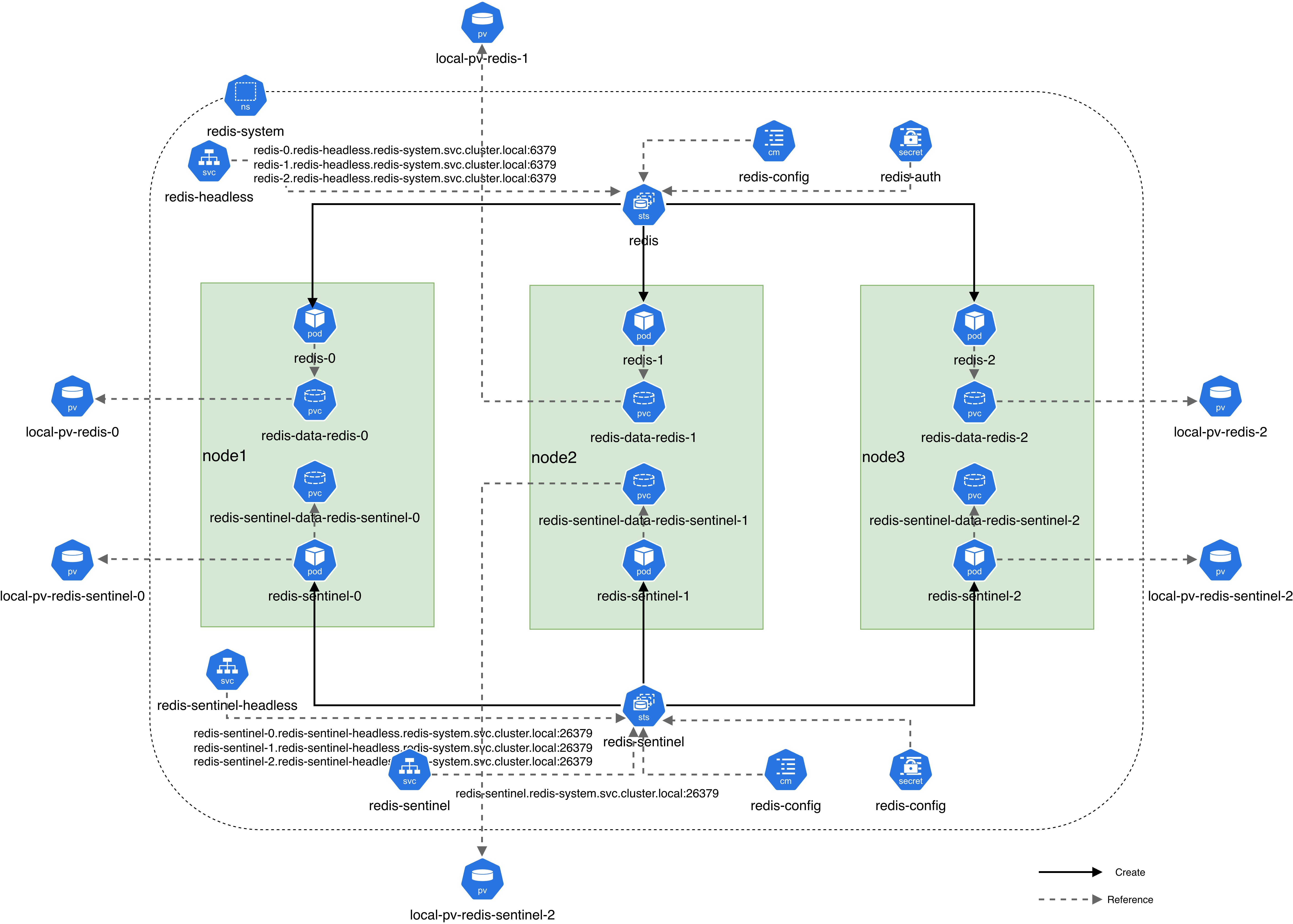
3.2 架构说明
整个方案部署在 redis-system 命名空间中,整体拆分为两套独立的 StatefulSet:一套用于部署 Redis 主从复制,另一套用于部署 Redis Sentinel 哨兵集群。
Redis 与 Sentinel 都采用 3 副本部署,并配置亲和性,分别部署在node1,node2,node3上。
在服务发现方面,Redis 使用 redis-headless 无头服务,为各个 Redis Pod 提供稳定的访问地址;Sentinel 使用 redis-sentinel-headless 无头服务,用于哨兵节点之间相互发现和通信。Sentinel 除了无头服务外,还额外提供了一个普通的 redis-sentinel Service,供 Redis 查询当前主节点信息,避免将主从关系直接写死在 ConfigMap 中。
在存储设计方面,先在各个节点上挂载高速 SSD 作为本地数据盘,再基于 Kubernetes 的 Local PersistentVolume 预先创建对应的本地卷。Redis 和 Sentinel 两套 StatefulSet 则通过 volumeClaimTemplates 动态申请各自的 PVC,并与预创建的本地 PV 进行绑定。这样设计的好处是,一方面能够充分利用本地 SSD 的性能优势,另一方面也能保证每个有状态 Pod 都拥有独立且固定的存储资源,在 Pod 重建后依然可以保留原有数据和运行状态。
在配置管理方面,Redis 和 Sentinel 的基础配置分别通过 ConfigMap 提供,认证信息则统一通过 Secret 注入。
在容器启动阶段,再通过initContainers对基础配置进行二次处理,生成最终实际生效的配置文件。
3.3 清单文件
.
├── 00-local-storage.yaml             # 创建 Local PV 所使用的 StorageClass
├── 00-redis-namespace.yaml           # 创建 Redis 集群使用的命名空间 redis-system
├── 01-redis-secret.yaml              # 创建 Redis 与 Sentinel 共用的密码 Secret
├── 02-redis-pv.yaml                  # 创建 Redis 数据节点使用的本地持久卷 PV
├── 03-redis-configmap.yaml           # 创建 Redis 基础配置 ConfigMap
├── 04-redis-service.yaml             # 创建 Redis Headless Service,提供稳定的网络标识
├── 05-redis-statefulset.yaml         # 创建 Redis StatefulSet,部署 Redis 一主两从集群
├── 06-sentinel-pv.yaml               # 创建 Sentinel 节点使用的本地持久卷 PV
├── 07-sentinel-configmap.yaml        # 创建 Sentinel 基础配置 ConfigMap
├── 08-sentinel-headless-service.yaml # 创建 Sentinel Headless Service,供哨兵节点相互发现
├── 09-sentinel-service.yaml          # 创建 Sentinel 普通 Service,供客户端或 Redis 统一访问
└── 10-sentinel-statefulset.yaml      # 创建 Sentinel StatefulSet,部署 3 个哨兵节点
4. 部署过程
4.1 创建数据存储目录
磁盘挂载就不做演示了,创建数据目录每个node都要执行
for (( i = 0; i < 3; i++ )); do
    mkdir -p "/data/localpv/redis-${i}"
    mkdir -p "/data/localpv/redis-sentinel-${i}"
    chown -R 999:999 "/data/localpv/redis-${i}" # redis官方容器里面用户id是999,不修改会有权限问题
    chown -R 999:999 "/data/localpv/redis-sentinel-${i}"
done
4.2 应用 00-local-storage.yaml
kubectl apply -f 00-local-storage.yamlapiVersion: storage.k8s.io/v1
kind: StorageClass
metadata:
name: local-storage
provisioner: kubernetes.io/no-provisioner # 没有外部 provisoner,静态制备
volumeBindingMode: WaitForFirstConsumer # pod创建后pvc再绑定,防止pvc与pv绑定,但是pod不能调度到pv所在的节点情况4.3 应用 00-redis-namespace.yaml
kubectl apply -f 00-redis-namespace.yamlapiVersion: v1
kind: Namespace
metadata:
name: redis-system4.4 应用 01-redis-secret.yaml
kubectl apply -f 01-redis-secret.yamlapiVersion: v1
kind: Secret
metadata:
name: redis-auth
namespace: redis-system
type: Opaque # Secret 类型,表示通用的自定义键值对 Secret
stringData:
REDIS_PASSWORD: "Redis_123!"4.5 应用 02-redis-pv.yaml
kubectl apply -f 02-redis-pv.yamlapiVersion: v1
kind: PersistentVolume
metadata:
name: local-pv-redis-0 # PV 名称,供 redis-0 对应的 PVC 绑定
spec:
capacity:
storage: 1Gi # 卷容量
volumeMode: Filesystem # 以文件系统方式挂载
accessModes: # 仅允许单节点读
- ReadWriteOnce
persistentVolumeReclaimPolicy: Retain # PVC 删除后保留数据,避免误删数据盘内容
storageClassName: local-storage # 绑定到 local-storage 这个 StorageClass
claimRef: # 预绑定,指定只能给这个 PVC 使用
namespace: redis-system
name: redis-data-redis-0
local:
path: /data/localpv/redis-0 # 节点本地高速 SSD 数据盘实际存储路径,需提前准备好目录
nodeAffinity: # 限制该 PV 只能在指定节点上被使用
required:
nodeSelectorTerms:
- matchExpressions:
- key: kubernetes.io/hostname
operator: In
values:
- node1 # local PV 绑定 node1,Pod 也只能调度到该节点才能挂载
---
apiVersion: v1
kind: PersistentVolume
metadata:
name: local-pv-redis-1
spec:
capacity:
storage: 1Gi
volumeMode: Filesystem
accessModes:
- ReadWriteOnce
persistentVolumeReclaimPolicy: Retain
storageClassName: local-storage
claimRef:
namespace: redis-system
name: redis-data-redis-1
local:
path: /data/localpv/redis-1
nodeAffinity:
required:
nodeSelectorTerms:
- matchExpressions:
- key: kubernetes.io/hostname
operator: In
values:
- node2
---
apiVersion: v1
kind: PersistentVolume
metadata:
name: local-pv-redis-2
spec:
capacity:
storage: 1Gi
volumeMode: Filesystem
accessModes:
- ReadWriteOnce
persistentVolumeReclaimPolicy: Retain
storageClassName: local-storage
claimRef:
namespace: redis-system
name: redis-data-redis-2
local:
path: /data/localpv/redis-2
nodeAffinity:
required:
nodeSelectorTerms:
- matchExpressions:
- key: kubernetes.io/hostname
operator: In
values:
- node34.6 应用 03-redis-configmap.yaml
kubectl apply -f 03-redis-configmap.yamlapiVersion: v1
kind: ConfigMap
metadata:
name: redis-config
namespace: redis-system
data:
redis.conf: |
# 网络
bind *
protected-mode yes
port 6379
tcp-backlog 1024
timeout 0
tcp-keepalive 300
maxclients 10000
# 进程与日志
daemonize no
pidfile ""
loglevel notice
logfile ""
# 基础参数
databases 16
always-show-logo no
set-proc-title yes
proc-title-template "{title} {listen-addr} {server-mode}"
locale-collate ""
# RDB
save 3600 1 300 100 60 10000
stop-writes-on-bgsave-error yes
rdbcompression yes
rdbchecksum yes
rdb-save-incremental-fsync yes
dbfilename dump.rdb
rdb-del-sync-files no
dir /data
# 复制
replica-serve-stale-data yes
replica-read-only yes
repl-diskless-sync yes
repl-diskless-sync-delay 5
repl-diskless-sync-max-replicas 0
repl-diskless-load disabled
repl-disable-tcp-nodelay no
repl-backlog-size 4mb
repl-backlog-ttl 3600
replica-priority 100
# 惰性释放 / ACL
acllog-max-len 128
lazyfree-lazy-eviction no
lazyfree-lazy-expire no
lazyfree-lazy-server-del no
replica-lazy-flush no
lazyfree-lazy-user-del no
lazyfree-lazy-user-flush no
# OOM / THP
oom-score-adj no
oom-score-adj-values 0 200 800
disable-thp yes
# AOF
appendonly yes
appendfilename "appendonly.aof"
appenddirname "appendonlydir"
appendfsync everysec
no-appendfsync-on-rewrite no
auto-aof-rewrite-percentage 100
auto-aof-rewrite-min-size 64mb
aof-load-truncated yes
aof-use-rdb-preamble yes
aof-timestamp-enabled no
# 监控 / 慢日志
slowlog-log-slower-than 10000
slowlog-max-len 128
latency-monitor-threshold 0
notify-keyspace-events ""
# 编码优化
hash-max-listpack-entries 512
hash-max-listpack-value 64
list-max-listpack-size -2
list-compress-depth 0
set-max-intset-entries 512
set-max-listpack-entries 128
set-max-listpack-value 64
zset-max-listpack-entries 128
zset-max-listpack-value 64
hll-sparse-max-bytes 3000
stream-node-max-bytes 4096
stream-node-max-entries 100
# 事件循环 / 内存分配
activerehashing yes
client-output-buffer-limit normal 0 0 0
client-output-buffer-limit replica 256mb 64mb 60
client-output-buffer-limit pubsub 32mb 8mb 60
hz 10
dynamic-hz yes
jemalloc-bg-thread yes
4.7 应用 04-redis-service.yaml
kubectl apply -f 04-redis-service.yamlapiVersion: v1
kind: Service
metadata:
name: redis-headless
namespace: redis-system
spec:
clusterIP: None
selector:
app: redis
ports:
- name: redis
port: 6379
targetPort: 63794.8 应用 05-redis-statefulset.yaml
4.8.1 为什么要用 initContainer
因为 Redis 不是简单挂个静态配置就能启动,Redis 需要在启动前动态决定:
当前 master 是谁
自己是不是 replica
密码怎么注入
对外通告地址是什么
所以用 initContainer 先生成最终配置,再启动主容器。
4.8.2 为什么要用 emptyDir 存最终配置
因为 ConfigMap 挂载是只读的,需要在 ConfigMap 的配置模板上动态追加:
requirepassmasterauthreplica-announce-ipreplicaof
所以必须先拷贝到可写目录,再生成最终配置。
4.8.3 为什么 Redis 启动前要先问 Sentinel
因为真实生产环境里,master 不一定永远是 redis-0。
如果发生过故障切换,新 Pod 重建时应该跟随当前 master,而不是死盯着初始 master。
4.8.4 为什么还要保留 bootstrap master
因为集群第一次冷启动时,Sentinel 可能还没起来。
这时候必须有一个兜底逻辑,否则 Redis 无法完成初始角色收敛。
kubectl apply -f 05-redis-statefulset.yamlapiVersion: apps/v1
kind: StatefulSet
metadata:
name: redis
namespace: redis-system
spec:
replicas: 3 # Redis 副本数,初始为 3 个节点
serviceName: redis-headless # 关联 Headless Service,给 StatefulSet Pod 提供稳定 DNS
selector:
matchLabels:
app: redis
podManagementPolicy: OrderedReady # 按顺序创建/删除 Pod,前一个 Ready 后才继续下一个
template:
metadata:
labels:
app: redis
spec:
securityContext:
fsGroup: 999 # 挂载卷的属组设置为 999,便于 Redis 进程访问持久卷和配置文件
topologySpreadConstraints:
- maxSkew: 1
topologyKey: kubernetes.io/hostname
whenUnsatisfiable: DoNotSchedule # 如果无法均匀分布到不同节点,则不再调度
labelSelector:
matchLabels:
app: redis
affinity:
nodeAffinity:
requiredDuringSchedulingIgnoredDuringExecution:
nodeSelectorTerms:
- matchExpressions:
- key: kubernetes.io/hostname
operator: In
values:
- node1
- node2
- node3 # 仅允许调度到这 3 个工作节点
podAntiAffinity:
preferredDuringSchedulingIgnoredDuringExecution:
- weight: 100
podAffinityTerm:
topologyKey: kubernetes.io/hostname
labelSelector:
matchLabels:
app: redis # 尽量把不同 Redis Pod 分散到不同节点,提升高可用
initContainers:
- name: init-redis-config
image: redis:8.2.1
command:
- sh
- -c
- |
set -eu
# -e: 任意命令失败立即退出
# -u: 使用未定义变量时立即报错退出
# 当前 Pod 的固定 FQDN,用于写入 replica-announce-ip
# 例如:redis-0.redis-headless.redis-system.svc.cluster.local
self_fqdn="${HOSTNAME}.redis-headless.redis-system.svc.cluster.local"
# 冷启动时的兜底主节点
# 当 Sentinel 尚未可用时,默认先把 redis-0 作为初始主节点
bootstrap_master="redis-0.redis-headless.redis-system.svc.cluster.local"
# 最终生成的运行时配置文件路径
target_conf="/etc/redis/redis.conf"
# ConfigMap 挂载进来的基础模板配置
source_conf="/config-source/redis.conf"
# 从 Secret 挂载目录中读取 Redis 密码
redis_password="$(cat /run/secrets/redis/REDIS_PASSWORD)"
if [ -z "$redis_password" ]; then
echo "REDIS_PASSWORD is empty" >&2
exit 1
fi
# 先定义主节点变量,后续优先从 Sentinel 获取
master_host=""
master_port="6379"
# 向 Sentinel 查询当前 master
# --raw 表示只输出纯文本,方便脚本解析
# 如果 Sentinel 不可用,这里返回空,不让脚本直接失败
sentinel_reply="$(redis-cli -h redis-sentinel -p 26379 -a "$redis_password" --raw sentinel get-master-addr-by-name mymaster 2>/dev/null || true)"
# 如果成功查到 master,则解析出 host 和 port
if [ -n "$sentinel_reply" ]; then
master_host="$(printf '%s\n' "$sentinel_reply" | sed -n '1p')"
master_port="$(printf '%s\n' "$sentinel_reply" | sed -n '2p')"
fi
# 如果 Sentinel 暂时没有返回 master,则回退到 bootstrap_master
if [ -z "$master_host" ]; then
master_host="$bootstrap_master"
master_port="6379"
fi
# 把 ConfigMap 中的基础配置复制到可写目录
# 并设置属主属组和权限
install -o 999 -g 999 -m 0640 "$source_conf" "$target_conf"
# 追加运行时动态配置
# 这些配置不直接写死在 ConfigMap 中,而是在 Pod 启动时生成
{
echo ""
echo "# injected from secret"
echo "requirepass ${redis_password}" # 当前 Redis 实例对外访问密码
echo "masterauth ${redis_password}" # 作为 replica 连接 master 时使用的认证密码
echo "replica-announce-ip ${self_fqdn}" # 向 master / Sentinel 通告自己的稳定地址
echo "replica-announce-port 6379" # 通告自己的 Redis 端口
} >> "$target_conf"
# 如果当前 Pod 不是 master,则追加 replicaof 配置
# 这样该 Pod 启动后会自动以从节点身份跟随当前 master
if [ "$self_fqdn" != "$master_host" ]; then
{
echo ""
echo "# injected from sentinel or bootstrap fallback"
echo "replicaof ${master_host} ${master_port}"
} >> "$target_conf"
fi
# 再次确保最终配置文件权限正确
chown 999:999 "$target_conf"
chmod 0640 "$target_conf"
volumeMounts:
- name: redis-config-source
mountPath: /config-source
readOnly: true # 只读挂载基础配置模板 ConfigMap
- name: redis-runtime-config
mountPath: /etc/redis # 运行时最终配置写到这里,主容器也从这里读取
- name: redis-auth
mountPath: /run/secrets/redis
readOnly: true # 挂载 Secret,供脚本读取密码
containers:
- name: redis
image: redis:8.2.1
args:
- redis-server
- /etc/redis/redis.conf # 使用 initContainer 生成的最终配置启动 Redis
ports:
- name: redis
containerPort: 6379
readinessProbe:
exec:
command:
- sh
- -c
- |
# 就绪探针:校验 Redis 是否已能正常响应 PING
redis_password="$(cat /run/secrets/redis/REDIS_PASSWORD)"
redis-cli -h 127.0.0.1 -p 6379 -a "$redis_password" ping | grep -q PONG
initialDelaySeconds: 5
periodSeconds: 5
livenessProbe:
tcpSocket:
port: 6379 # 存活探针:检查 Redis 端口是否还存活
initialDelaySeconds: 15
periodSeconds: 10
volumeMounts:
- name: redis-runtime-config
mountPath: /etc/redis # 挂载运行时生成的最终配置文件
- name: redis-data
mountPath: /data # Redis 数据目录,AOF/RDB 都保存在这里
- name: redis-auth
mountPath: /run/secrets/redis
readOnly: true # 挂载 Secret,探针等逻辑也会读取密码
volumes:
- name: redis-config-source
configMap:
name: redis-config # Redis 基础配置模板来源
- name: redis-runtime-config
emptyDir: {} # 可写的临时目录,用来保存 initContainer 生成的最终配置
- name: redis-auth
secret:
secretName: redis-auth # Redis 与 Sentinel 共用的密码 Secret
defaultMode: 0400 # 只读权限,降低敏感信息暴露风险
volumeClaimTemplates:
- metadata:
name: redis-data # StatefulSet 会自动生成 redis-data-redis-0/1/2 这类 PVC
spec:
accessModes:
- ReadWriteOnce
storageClassName: local-storage # 绑定本地存储 StorageClass
resources:
requests:
storage: 1Gi # 每个 Redis Pod 申请 1Gi 持久化存储4.9 应用 06-sentinel-pv.yaml
sentinel的yaml思路基本上和上面的一样,就只在关键地方写注释了
kubectl apply -f 06-sentinel-pv.yamlapiVersion: v1
kind: PersistentVolume
metadata:
name: local-pv-redis-sentinel-0
spec:
capacity:
storage: 1Gi
volumeMode: Filesystem
accessModes:
- ReadWriteOnce
persistentVolumeReclaimPolicy: Retain
storageClassName: local-storage
claimRef:
namespace: redis-system
name: redis-sentinel-data-redis-sentinel-0
local:
path: /data/localpv/redis-sentinel-0
nodeAffinity:
required:
nodeSelectorTerms:
- matchExpressions:
- key: kubernetes.io/hostname
operator: In
values:
- node1
---
apiVersion: v1
kind: PersistentVolume
metadata:
name: local-pv-redis-sentinel-1
spec:
capacity:
storage: 1Gi
volumeMode: Filesystem
accessModes:
- ReadWriteOnce
persistentVolumeReclaimPolicy: Retain
storageClassName: local-storage
claimRef:
namespace: redis-system
name: redis-sentinel-data-redis-sentinel-1
local:
path: /data/localpv/redis-sentinel-1
nodeAffinity:
required:
nodeSelectorTerms:
- matchExpressions:
- key: kubernetes.io/hostname
operator: In
values:
- node2
---
apiVersion: v1
kind: PersistentVolume
metadata:
name: local-pv-redis-sentinel-2
spec:
capacity:
storage: 1Gi
volumeMode: Filesystem
accessModes:
- ReadWriteOnce
persistentVolumeReclaimPolicy: Retain
storageClassName: local-storage
claimRef:
namespace: redis-system
name: redis-sentinel-data-redis-sentinel-2
local:
path: /data/localpv/redis-sentinel-2
nodeAffinity:
required:
nodeSelectorTerms:
- matchExpressions:
- key: kubernetes.io/hostname
operator: In
values:
- node34.10 应用 07-sentinel-configmap.yaml
kubectl apply -f 07-sentinel-configmap.yamlapiVersion: v1
kind: ConfigMap
metadata:
name: redis-sentinel-config
namespace: redis-system
data:
sentinel.conf: |
# 网络
bind *
port 26379
# 进程与日志
daemonize no
pidfile ""
loglevel notice
logfile ""
# Sentinel 运行目录
dir /data
# 判定主节点下线时间(毫秒)
sentinel down-after-milliseconds mymaster 3000
# 故障转移时,同时允许重新同步到新主的副本数
sentinel parallel-syncs mymaster 1
# 故障转移超时时间(毫秒)
sentinel failover-timeout mymaster 180000
# 安全与行为控制
sentinel deny-scripts-reconfig yes
sentinel resolve-hostnames yes
sentinel announce-hostnames yes
sentinel master-reboot-down-after-period mymaster 0
# ACL 日志
acllog-max-len 1284.11 应用 08-sentinel-headless-service.yaml
kubectl apply -f 08-sentinel-headless-service.yamlapiVersion: v1
kind: Service
metadata:
name: redis-sentinel-headless
namespace: redis-system
spec:
clusterIP: None
selector:
app: redis-sentinel
ports:
- name: sentinel
port: 26379
targetPort: 263794.12 应用 09-sentinel-service.yaml
kubectl apply -f 09-sentinel-service.yamlapiVersion: v1
kind: Service
metadata:
name: redis-sentinel
namespace: redis-system
spec:
selector:
app: redis-sentinel
ports:
- name: sentinel
port: 26379
targetPort: 263794.13 应用 10-sentinel-statefulset.yaml
kubectl apply -f 10-sentinel-statefulset.yamlapiVersion: apps/v1
kind: StatefulSet
metadata:
name: redis-sentinel
namespace: redis-system
spec:
replicas: 3
serviceName: redis-sentinel-headless # 关联 Headless Service,为每个 Sentinel Pod 提供稳定 DNS
selector:
matchLabels:
app: redis-sentinel
podManagementPolicy: OrderedReady # 按顺序创建/删除 Pod,前一个 Ready 后再处理下一个
template:
metadata:
labels:
app: redis-sentinel
spec:
securityContext:
fsGroup: 999 # 挂载卷的属组设置为999
topologySpreadConstraints:
- maxSkew: 1
topologyKey: kubernetes.io/hostname
whenUnsatisfiable: DoNotSchedule # 若无法均匀分布到不同节点,则不再调度
labelSelector:
matchLabels:
app: redis-sentinel
affinity:
nodeAffinity:
requiredDuringSchedulingIgnoredDuringExecution:
nodeSelectorTerms:
- matchExpressions:
- key: kubernetes.io/hostname
operator: In
values:
- node1
- node2
- node3 # 仅允许调度到这 3 个工作节点
podAntiAffinity:
preferredDuringSchedulingIgnoredDuringExecution:
- weight: 100
podAffinityTerm:
topologyKey: kubernetes.io/hostname
labelSelector:
matchLabels:
app: redis-sentinel # 尽量将不同 Sentinel Pod 分散到不同节点,提升可用性
initContainers:
- name: init-sentinel-config
image: redis:8.2.1
command:
- sh
- -c
- |
set -eu
# ConfigMap 中挂载进来的基础 sentinel 配置模板
source_conf="/config-source/sentinel.conf"
# 最终生成并供主容器使用的可写配置文件路径
target_conf="/etc/redis/sentinel.conf"
# 冷启动时的兜底 master
# 当 Redis 节点状态暂时还探测不到时,默认先将 redis-0 作为初始主节点
bootstrap_master="redis-0.redis-headless.redis-system.svc.cluster.local"
# 当前 Sentinel Pod 的稳定 FQDN,用于写入 sentinel announce-ip
self_sentinel_fqdn="${HOSTNAME}.redis-sentinel-headless.redis-system.svc.cluster.local"
# 初始化 master 信息变量
master_host=""
master_port="6379"
# 从 Secret 中读取 Redis 密码,供探测 Redis 和配置 Sentinel 认证使用
redis_password="$(cat /run/secrets/redis/REDIS_PASSWORD)"
if [ -z "$redis_password" ]; then
echo "REDIS_PASSWORD is empty" >&2
exit 1
fi
# 依次探测 3 个 Redis 节点,读取 INFO replication 信息
# 谁返回 role:master,就认为当前它是集群中的主节点
for host in \
redis-0.redis-headless.redis-system.svc.cluster.local \
redis-1.redis-headless.redis-system.svc.cluster.local \
redis-2.redis-headless.redis-system.svc.cluster.local
do
replication_info="$(redis-cli -h "$host" -p 6379 -a "$redis_password" --raw INFO replication 2>/dev/null || true)"
if printf '%s\n' "$replication_info" | grep -q '^role:master'; then
master_host="$host"
break
fi
done
# 如果暂时没有探测到 master,则回退到 bootstrap_master
# 这样可以保证集群在第一次冷启动时也能顺利拉起
if [ -z "$master_host" ]; then
master_host="$bootstrap_master"
fi
# 将 ConfigMap 中的基础配置复制到可写目录
# 并设置属主、属组及权限
install -o 999 -g 999 -m 0640 "$source_conf" "$target_conf"
# 在基础配置后追加运行时动态参数
{
echo ""
echo "# injected at startup"
echo "sentinel monitor mymaster ${master_host} ${master_port} 2" # 监控当前探测到的 master,法定人数为 2
echo "sentinel auth-pass mymaster ${redis_password}" # Sentinel 访问 Redis master/replica 时使用的密码
echo "requirepass ${redis_password}" # 访问 Sentinel 自身时需要的密码
echo "sentinel announce-ip ${self_sentinel_fqdn}" # 对外通告当前 Sentinel 的稳定地址
echo "sentinel announce-port 26379" # 对外通告当前 Sentinel 的端口
} >> "$target_conf"
# 再次确保最终配置文件权限正确
chown 999:999 "$target_conf"
chmod 0640 "$target_conf"
volumeMounts:
- name: redis-sentinel-config-source
mountPath: /config-source
readOnly: true # 只读挂载 Sentinel 基础配置模板
- name: redis-sentinel-runtime-config
mountPath: /etc/redis # 运行时最终配置文件写到这里,主容器也从这里读取
- name: redis-auth
mountPath: /run/secrets/redis
readOnly: true # 挂载密码 Secret,供脚本读取
containers:
- name: redis-sentinel
image: redis:8.2.1
args:
- redis-sentinel
- /etc/redis/sentinel.conf # 使用 initContainer 生成的最终配置启动 Sentinel
ports:
- name: sentinel
containerPort: 26379
readinessProbe:
exec:
command:
- sh
- -c
- |
# 就绪探针:验证 Sentinel 是否已能正常响应 PING
redis_password="$(cat /run/secrets/redis/REDIS_PASSWORD)"
redis-cli -h 127.0.0.1 -p 26379 -a "$redis_password" ping | grep -q PONG
initialDelaySeconds: 5
periodSeconds: 5
livenessProbe:
tcpSocket:
port: 26379 # 存活探针:检测 Sentinel 端口是否仍然存活
initialDelaySeconds: 15
periodSeconds: 10
volumeMounts:
- name: redis-sentinel-runtime-config
mountPath: /etc/redis # 挂载运行时生成的最终配置
- name: redis-sentinel-data
mountPath: /data # Sentinel 运行目录,保存运行过程中改写的状态信息
- name: redis-auth
mountPath: /run/secrets/redis
readOnly: true # 挂载密码 Secret
volumes:
- name: redis-sentinel-config-source
configMap:
name: redis-sentinel-config # Sentinel 基础配置模板来源
- name: redis-sentinel-runtime-config
emptyDir: {} # 可写临时目录,用于保存 initContainer 生成的最终配置
- name: redis-auth
secret:
secretName: redis-auth # Redis 与 Sentinel 共用的认证密码 Secret
defaultMode: 0400 # 只读权限,降低敏感信息暴露风险
volumeClaimTemplates:
- metadata:
name: redis-sentinel-data # StatefulSet 会自动生成 redis-sentinel-data-redis-sentinel-0/1/2 这类 PVC
spec:
accessModes:
- ReadWriteOnce
storageClassName: local-storage # 绑定本地存储 StorageClass
resources:
requests:
storage: 1Gi5. 故障模拟
root@master1:~# kubectl get pod -n redis-system
NAME               READY   STATUS    RESTARTS   AGE
redis-0            1/1     Running   0          5m28s
redis-1            1/1     Running   0          5m20s
redis-2            1/1     Running   0          5m12s
redis-sentinel-0   1/1     Running   0          5m20s
redis-sentinel-1   1/1     Running   0          5m12s
redis-sentinel-2   1/1     Running   0          5m4s
# redis-0 pod 为当前 master
root@master1:~# kubectl exec -it -n redis-system pods/redis-0 -- redis-cli -a 'Redis_123!' info replication
Defaulted container "redis" out of: redis, init-redis-config (init)
Warning: Using a password with '-a' or '-u' option on the command line interface may not be safe.
# Replication
role:master
connected_slaves:2
slave0:ip=redis-1.redis-headless.redis-system.svc.cluster.local,port=6379,state=online,offset=37339084,lag=0
slave1:ip=redis-2.redis-headless.redis-system.svc.cluster.local,port=6379,state=online,offset=37339084,lag=0
master_failover_state:no-failover
master_replid:122a05c61b3229beab9e54b248be550157880307
master_replid2:0000000000000000000000000000000000000000
master_repl_offset:37339324
second_repl_offset:-1
repl_backlog_active:1
repl_backlog_size:4194304
repl_backlog_first_byte_offset:37229082
repl_backlog_histlen:110243# 使 node1 不能再有新的 pod
root@master1:~# kubectl cordon node1
node/node1 cordoned# delete redis-0,模拟 master 宕机
root@master1:~# kubectl delete -n redis-system pods redis-0
pod "redis-0" deleted# 确定 master 已宕机
root@master1:~# kubectl get pods -n redis-system
NAME READY STATUS RESTARTS AGE
redis-0 0/1 Pending 0 22s
redis-1 1/1 Running 0 10m
redis-2 1/1 Running 0 10m
redis-sentinel-0 1/1 Running 0 10m
redis-sentinel-1 1/1 Running 0 10m
redis-sentinel-2 1/1 Running 0 10m# redis-1 为新的 master,确定故障转移没问题
root@master1:~# kubectl exec -it -n redis-system pods/redis-1 -- redis-cli -a 'Redis_123!' info replication
Defaulted container "redis" out of: redis, init-redis-config (init)
Warning: Using a password with '-a' or '-u' option on the command line interface may not be safe.
# Replication
role:master
connected_slaves:1
slave0:ip=redis-2.redis-headless.redis-system.svc.cluster.local,port=6379,state=online,offset=37457187,lag=1
master_failover_state:no-failover
master_replid:a3a1024a34c8b98970c7abb3edd4c3aded499ab4
master_replid2:122a05c61b3229beab9e54b248be550157880307
master_repl_offset:37457187
second_repl_offset:37442285
repl_backlog_active:1
repl_backlog_size:4194304
repl_backlog_first_byte_offset:37229599
repl_backlog_histlen:227589# 恢复 node1 调度
root@master1:~# kubectl uncordon node1
node/node1 uncordoned
root@master1:~# kubectl get pods -n redis-system
NAME READY STATUS RESTARTS AGE
redis-0 0/1 PodInitializing 0 66s
redis-1 1/1 Running 0 11m
redis-2 1/1 Running 0 11m
redis-sentinel-0 1/1 Running 0 11m
redis-sentinel-1 1/1 Running 0 11m
redis-sentinel-2 1/1 Running 0 11m
root@master1:~# kubectl get pods -n redis-system
NAME READY STATUS RESTARTS AGE
redis-0 0/1 Running 0 71s
redis-1 1/1 Running 0 11m
redis-2 1/1 Running 0 11m
redis-sentinel-0 1/1 Running 0 11m
redis-sentinel-1 1/1 Running 0 11m
redis-sentinel-2 1/1 Running 0 11m
root@master1:~# kubectl get pods -n redis-system
NAME READY STATUS RESTARTS AGE
redis-0 1/1 Running 0 79s
redis-1 1/1 Running 0 11m
redis-2 1/1 Running 0 11m
redis-sentinel-0 1/1 Running 0 11m
redis-sentinel-1 1/1 Running 0 11m
redis-sentinel-2 1/1 Running 0 11m# 确定 redis-0 已经成为新的 slave
root@master1:~# kubectl exec -it -n redis-system pods/redis-1 -- redis-cli -a 'Redis_123!' info replication
Defaulted container "redis" out of: redis, init-redis-config (init)
Warning: Using a password with '-a' or '-u' option on the command line interface may not be safe.
# Replication
role:master
connected_slaves:2
slave0:ip=redis-2.redis-headless.redis-system.svc.cluster.local,port=6379,state=online,offset=37471850,lag=1
slave1:ip=redis-0.redis-headless.redis-system.svc.cluster.local,port=6379,state=online,offset=37471610,lag=1
master_failover_state:no-failover
master_replid:a3a1024a34c8b98970c7abb3edd4c3aded499ab4
master_replid2:122a05c61b3229beab9e54b248be550157880307
master_repl_offset:37471850
second_repl_offset:37442285
repl_backlog_active:1
repl_backlog_size:4194304
repl_backlog_first_byte_offset:37229599
repl_backlog_histlen:242252
root@master1:~#